Get the latest insights and updates delivered to your inbox weekly.
Thank you! Your submission has been received!
Oops! Something went wrong while submitting the form.
Trusted by Leading Brands
‘‘Brockbank Consulting transformed our operations and boosted our efficiency.’’
--Emily Johnson, CEO at Tech Innovations
Overview
Discover how a leading medical spa software company is revolutionizing its operations with a comprehensive Zoho system implementation. This transformation focuses on automating sales processes, enhancing lead management, and integrating advanced marketing attribution tools. By replacing outdated systems with Zoho CRM Plus, the company aims to streamline workflows, improve response times, and boost sales efficiency. Learn about the strategic integration of Zoho applications like Zoho Campaigns, Zoho Sign, and Zoho Analytics to optimize marketing efforts and track ROI effectively. Explore how this digital transformation supports scalability and positions the company for future growth in the competitive medical spa industry. Uncover the benefits of a unified CRM solution tailored for SaaS businesses.
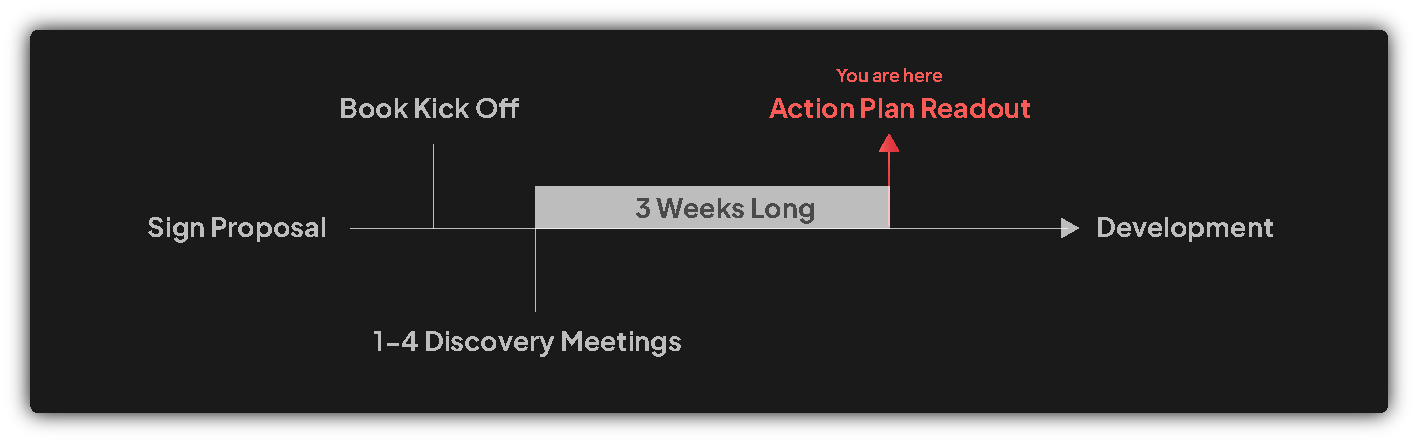
High-Level Plan
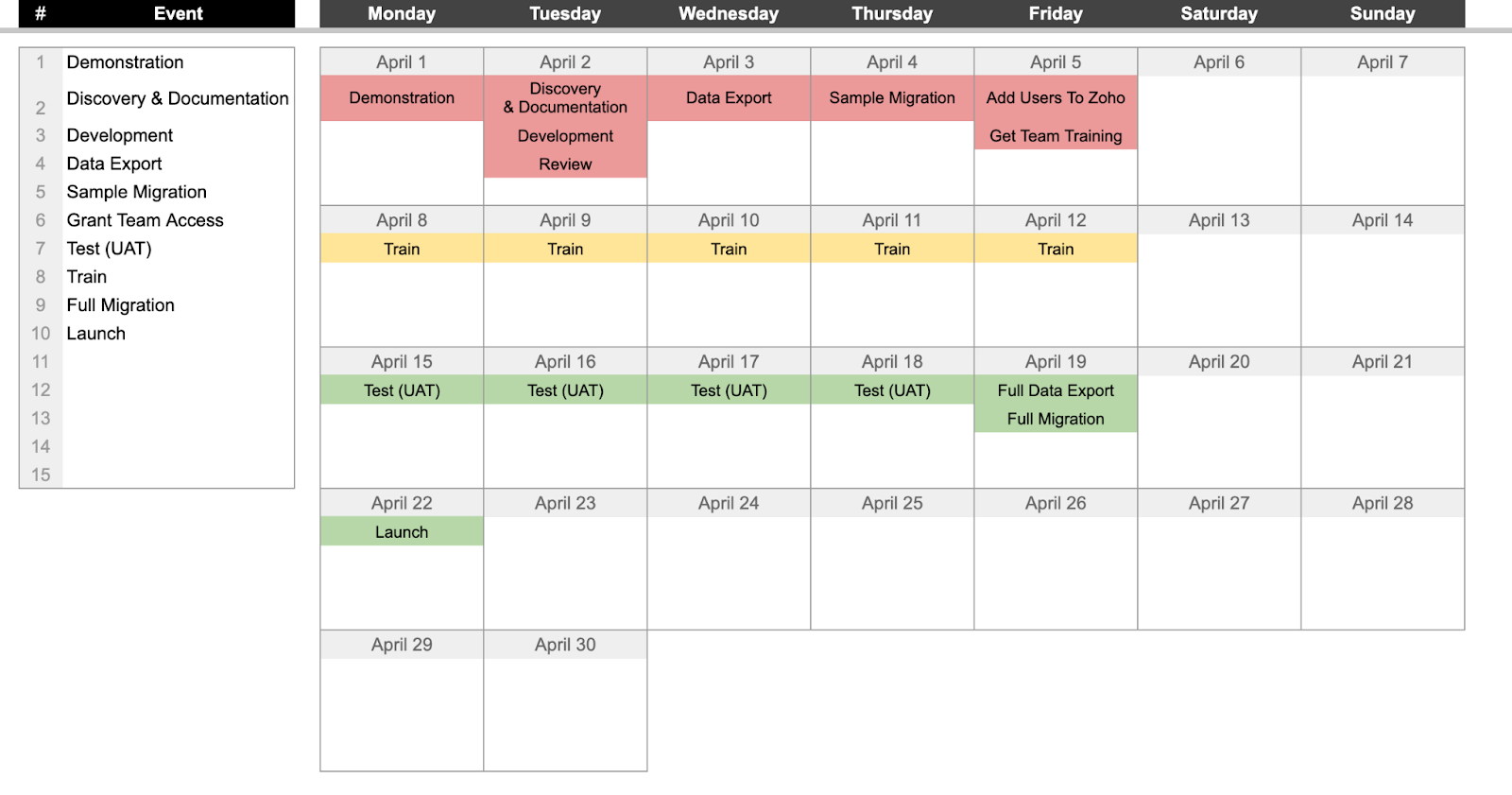
Discovery & Documentation
Development (Configure, customize, code)
NOTE:
Review progress with the team weekly during development
Rolling Wave Method – Rolling Wave means we start with a full plan, but as we move through it from top to bottom, we add more detail and adjust priorities along the way. It’s like building a house: first you get the whole blueprint, then you focus on the main rooms, and later you decide if the extras—like a porch or garage—are still needed. It’s a mix of waterfall project management (having a big plan) and sprint methodology (working in smaller steps). In our weekly meetings, we recommend what to tackle next, but you make the final call on what’s a “must-have” for the first version (MVP). This helps us finish faster, avoid rework, and make sure the system fits your real needs.
Create training videos as development
See below for detailed action plan
Review
Full system review
Migrate Data
Train (UAT)
Schedule Go-Live (typically on a Monday)
Detailed Development Plan
Migration and Timeline
Brockbank Consulting will migrate existing data from INETPortal CRM to Zoho including leads, deals, contacts, and accounts
Implementation target is October 1st for sales team go-live (7 sales team members)
Team training will be provided for both administrators and standard users
Brockbank Consulting will provide ongoing support at $200/hour after initial implementation
Lead Generation
Brockbank Consulting will set up Zoho Sales IQ with client team that way chats come through to Zoho Sales IQ
Marketing team will generate leads through multiple channels including SEO (126 leads/month), Google Ads (22 leads/month in July), Meta Ads (86 leads/month in July), software review platforms like Gartner and Software Finder (53 leads/month), and partner referrals
Marketing team will maintain $41,000 monthly advertising budget across all channels ($14-15,000 Google Ads, $5-11,000 Meta Ads, $15,000 software review platforms)
Brockbank Consulting will integrate Google Ads with Zoho CRM to track marketing data and attribution
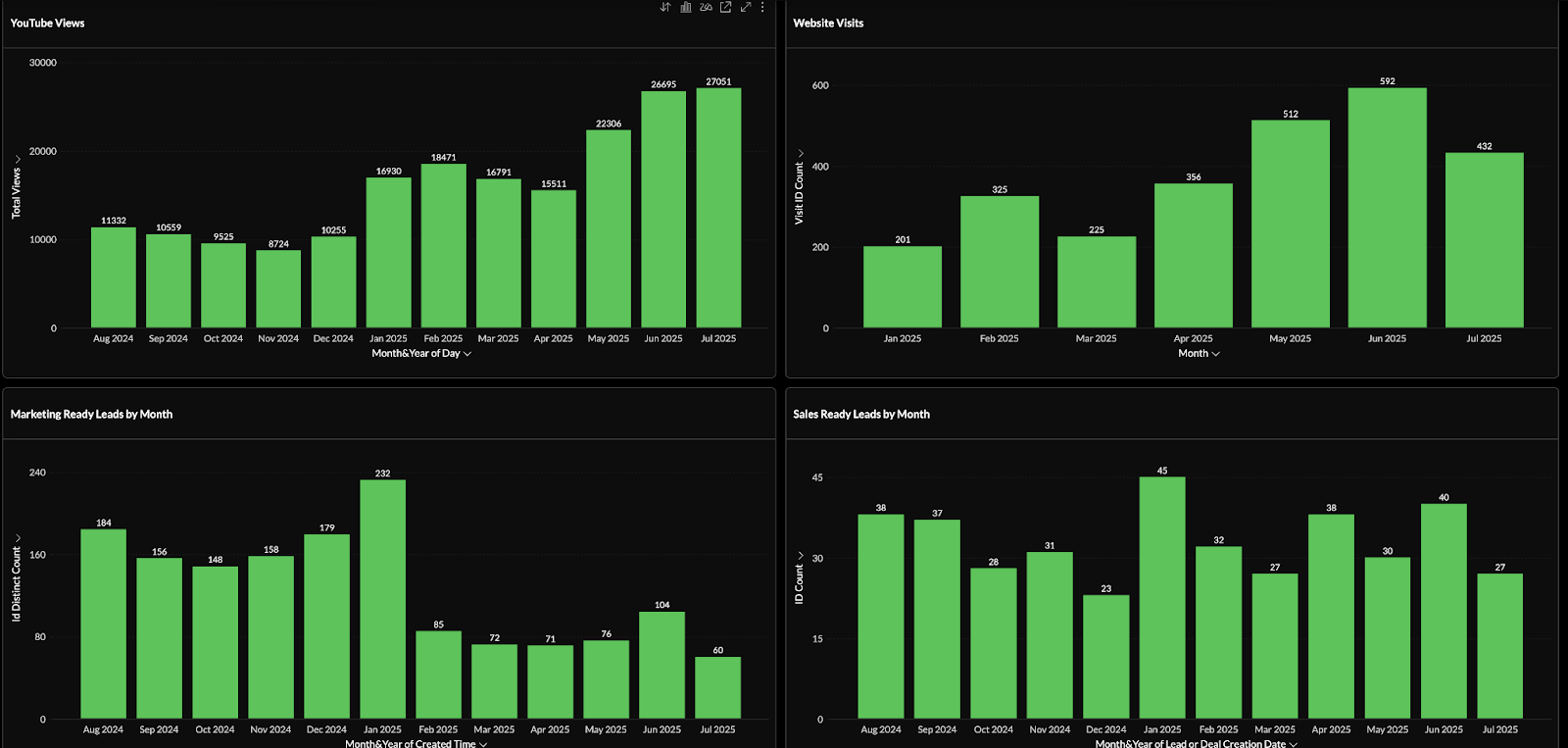
Brockbank Consulting will set up executive dashboard (completed via ZBlitz)
Dashboard
Brockbank Consulting will implement Attributer.io tracking to capture UTM parameters and marketing attribution data across all lead sources
Zoho will automatically capture first-touch attribution data when leads are created
Lead Conversion and Form Submission
Prospects will fill out “Get the Demo” form on client website with name, email, company, and phone number
Zoho will automatically create lead record when form is submitted with the lead status = Sales Ready
Zoho will send immediate automated thank you email to prospect upon form submission
Zoho will send automated text message to prospect upon form submission
NOTE: Sinch MessageMedia extension will be used here, client will need to purchase MessageMedia and send us their credentials so we can set up the extension
NOTES: Current system has a two-step process (initial form then Calendly booking) causing drop-off issues. We recommended testing single Calendly form to improve conversion rates, but client noted management preference to keep initial form for research-stage prospects
Brockbank Consulting will create end-to-end stages in Zoho CRM:
Lead Statuses:
Marketing Ready - Newsletter subscribers and research-stage prospects
Sales Ready - Qualified prospects ready for outreach and demo booking
Reached - Prospects who have been successfully contacted by sales team
Demo Scheduled - Prospects with confirmed demonstration appointments
Recycled - Leads being nurtured through automated sequences
Rejected - Disqualified prospects (spam, Henry Foleys, etc.)
Closed Lost - Deal lost at any stage of sales process
Account Stages:
Prospect - Potential customers in active sales process
Customer - Active paying subscribers of client
Partner - Referral partners and strategic alliances
Lost - Former prospects who didn’t convert
Brockbank Consulting will create end-to-end video showing user journey through Zoho CRM
Brockbank Consulting will include journey map document as webtab in Zoho CRM displaying each stage and definition for user reference
Lead Qualification and Assignment
Sales coordinator will review incoming leads for qualification within 5-10 minutes
Sales coordinator will verify lead legitimacy by checking business details and contact information
Sales coordinator will attempt initial phone contact and leave voicemail if needed
Sales coordinator will send initial email outreach if phone contact unsuccessful
Zoho will automatically assign qualified leads to sales representatives using round-robin distribution
NOTES: Current manual process causes delays and inconsistencies. Goal is to automate as much as possible while maintaining lead quality
Lead Nurturing Cadence
Sales representatives will follow standardized cadence of 3 contacts on first day and 3 contacts on second day
Sales representatives will make at least one phone call attempt per lead
Brockbank Consulting will create a cadence that will automate the follow up sequence and notify sales reps when they are needed to do parts of the cadence that can’t be automated
Zoho will create automated email sequences for lead nurturing
Zoho will create automated text message sequences for follow-up
Zoho will create tasks and reminders for sales representatives to ensure consistent follow-up
Sales representatives will continue outreach efforts for 45 days before marking leads as recycled
NOTES: Client will provide current SOP document to inform automation design. Current conversion rate is 45% from marketing-ready leads to sales-ready leads (300 leads → 120 demos → 65 sales)
Demo Booking and Scheduling
Prospects will book demo appointments through Calendly
NOTE: round robin with Calendly form on website
Calendly will automatically sync demo appointments to sales representative calendars
Brockbank Consulting will train client team to connect their emails and calendars with Zoho CRM
Zoho will convert a lead to a contact/account/deal record when demo is successfully booked
NOTE: if no lead exists, a contact/account/deal will be created and assigned using round robin
NOTE: if we can match Calendly's lead assignment with Zoho’s that would be ideal
Sales representatives will conduct pre-discovery call to understand prospect needs and confirm demo requirements
NOTES: Current system has disconnect between initial form assignment and Calendly booking, causing confusion about lead ownership
Demo Execution
Sales representatives will conduct 30-60 minute product demonstrations via Zoom
Sales representatives will record demo sessions for future reference
Sales representatives will attempt to close deals during initial demo call when possible
Brockbank Consulting will integrate Zoom AI transcription to automatically capture demo notes in Zoho CRM
Zoho will store all demo recordings and transcripts in contact records
NOTES: Zoom replaced GoTo Meeting due to better user experience and adoption rates
Agreement and Contract Process
Sales representatives will send 4-page agreements to qualified prospects after successful demos
Brockbank Consulting will integrate Zoho Sign for automated contract generation and e-signature workflow
Zoho will merge contact and deal information into contract templates automatically
Zoho Sign will send automated reminder emails to prospects who haven’t signed contracts
Zoho will trigger automated follow-up sequences for unsigned contracts
NOTES: Current manual DocuSign process causes significant drop-off (20 deals per month ghost after receiving contracts)
Deal Closure and Handoff
Zoho will automatically mark deals as “Closed Won” when contracts are fully executed
Zoho will trigger automated congratulations email to new customers upon contract completion
Sales representatives will book kickoff calls with Customer Success Manager for new customers
Zoho will create automated handoff email from sales representative to assigned CSM
Customer Success Manager will collect payment and begin onboarding process
NOTES: All post-sale activities currently handled in INETPortal system, requiring data export from Zoho
Data Export to Legacy System
Zoho Flow will automatically export closed won customer data to INETPortal system via API integration
NOTE: Client will have to purchase Zoho Flow separately in order to support this
Export will include contact information, business details, and all interaction notes
CEO/developer will build API endpoint to receive data from Zoho
Brockbank Consulting will configure webhook triggers to send data when deals are marked closed won
NOTES: team member needs 1-2 weeks advance notice to build API integration on INETPortal side
Additional Requirements
Marketing Automation and Campaigns:
Brockbank Consulting will integrate existing Zoho Campaigns with Zoho CRM for seamless lead nurturing
Marketing team will sync all email marketing campaigns with CRM for complete lead tracking
Brockbank Consulting can implement AI assistant capabilities for automated lead qualification and response
Marketing team will maintain social media scheduling through Zoho Social (migrated from Hootsuite)
Referral Partner Management:
Brockbank Consulting will create referral partner tracking system using Accounts module with custom “Referrer” field
Brockbank Consulting will generate unique referral forms for each partner with automatic attribution
Zoho Flow will automatically create partner-specific referral links when new referral accounts are created
Referral partners will receive $300 per successfully closed deal
Brockbank Consulting will enable partner portal for referrers to track their referred leads and commissions
Brand ambassadors will be tracked separately for cost accounting purposes
Communication Integration:
Brockbank Consulting will integrate existing email systems (Outlook) with Zoho CRM using IMAP
Brockbank Consulting will implement MessageMedia Sinch for SMS functionality within Zoho CRM
All text messages, emails, and call logs will automatically sync to contact records
GoTo Connect phone system will remain in use but integrate with Zoho for call logging
Reporting and Analytics:
Brockbank Consulting will create comprehensive lead source tracking with cost-per-acquisition reporting
Marketing team will track detailed campaign performance including Google Ads keyword-level attribution
Sales management will monitor team performance with conversion rate tracking and pipeline analytics
Brockbank Consulting will implement executive dashboard for high-level business metrics
AI:
Brockbank Consulting will discuss potential AI capabilities after minimum viable systems are created
Get the latest insights and updates delivered to your inbox weekly.
Thank you! Your submission has been received!
Oops! Something went wrong while submitting the form.
Trusted by Leading Brands
"They have a gift for clearly explaining how Zoho should work. If you’re serious about getting the most out of Zoho, partnering with Brockbank Consulting is a no-brainer."
Book your free consultation to learn how Zoho should work for your business. We will show you the best practice ways to set it up and use it for your industry so you get the most out of Zoho.


.png)