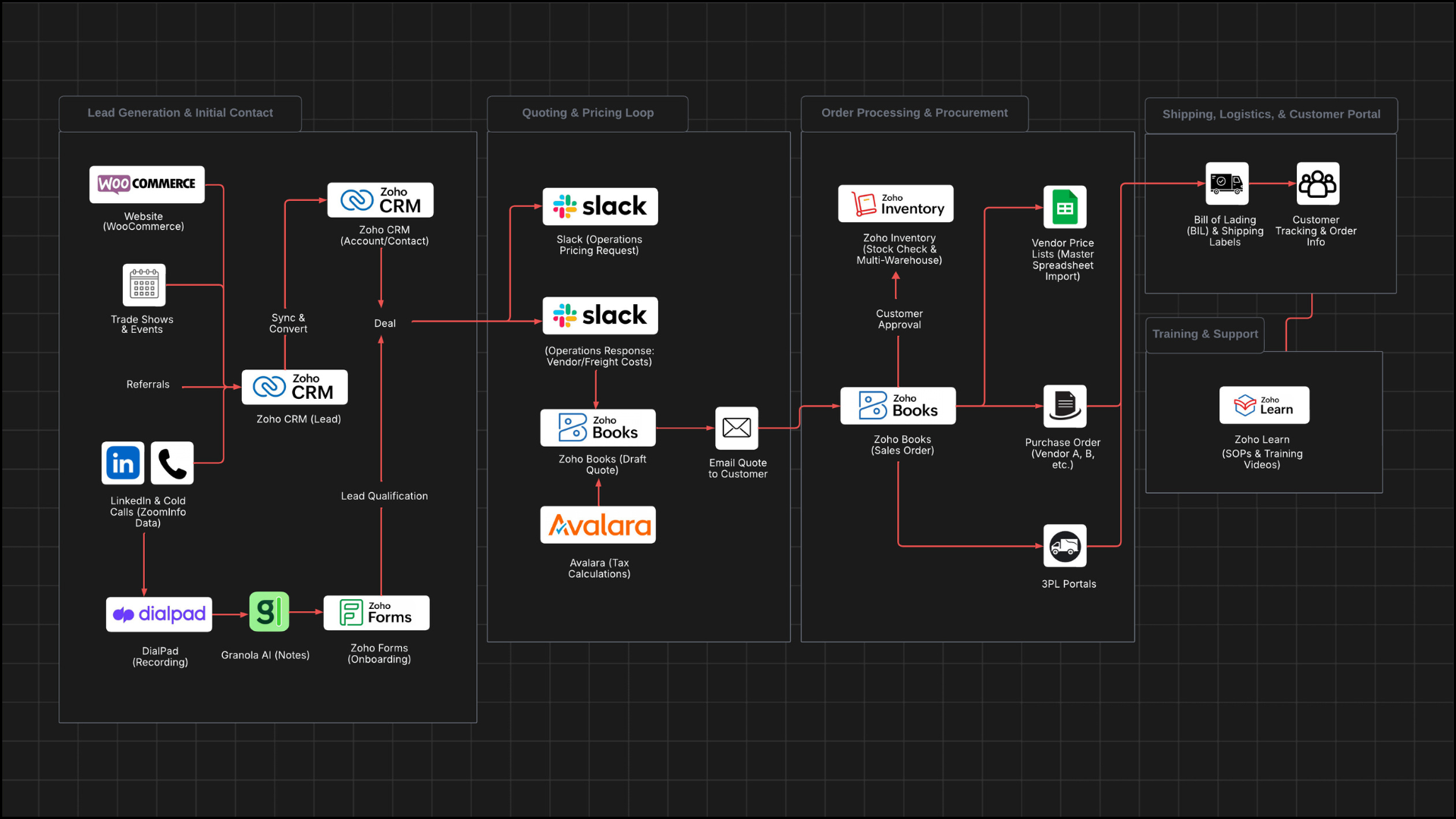
Zoho Action Plan
Discover how a 9-person commodity supply firm transformed their operations with Zoho CRM integration. Learn about their journey from manual processes to streamlined automation, optimizing client management and sales operations. Explore the challenges faced, solutions implemented, and the impact on their business efficiency. Perfect for small to medium-sized businesses in the chemical, solvent, and food ingredient supply industries looking to enhance their CRM strategy. Unlock the potential of Zoho CRM for your business today.
Ideal Customer Profile and Target Market
- Target market consists of manufacturers who produce end goods using various commodities
- Procurement managers, buyers, supply chain executives, COOs, and CEOs (if smaller companies)
- Retail stores represent a small portion of business and are not a focus area
- Notable clients include Jimmy Bars
- Company currently has 70-80 active clients
- Team structure includes 3 owner-operators, 4 outsourced sales reps, and 1 assistant
Customer Journey and Supporting Internal Processes
Lead Qualification and Conversion
- Sales rep will conduct initial phone call to gauge interest
- Brockbank Consulting will train the sales team to use Granola and Granola templates to take notes during all client discussions, so they can ask question to the notes AI and also output the conversation in a consistent way
- NOTE: granola was used during this discovery process to better consolidate all notes, screenshots, transcriptions, etc.
- Brockbank Consulting will train the sales team to converts leads after the first sales call OR once the prospect expresses interest in receiving a quote via a Loom video and Zoho Learn SOP (additional training can be given if needed)
- NOTES: The sooner leads are converted, the sooner quotes can be sent
- NOTES: Once a prospect is qualified during an initial call, or if they express interest in a quote they are “Pipeline Ready” (i.e. ready for the deals module)
- Sales rep will convert qualified lead to account, contact, and deal simultaneously
- Sales rep will send client onboarding form via Zoho Forms
- Form integrates with accounts module in Zoho
- NOTES: Currently experiencing issues with duplicate addresses causing errors
- Brockbank Consulting will create configure the client onboarding form (this form already exists, we need to modify it) to link the Account ID and generate properly
- Link will be accessible from bottom left-hand corner section in Zoho CRM lead and account record
- NOTE: if its filled out with a lead ID the form submission should trigger a conversion of the lead. If it’s filled with an account ID it should fill out all the information on the account
- Zoho will convert the lead when onboarding form is completed
- NOTES: 90% of prospects fill out onboarding form, 10% want pricing first before providing information. This system will allow the reps to convert the leads for that 10% of the time, and send the onboarding form via the account (bottom-left hand corner form link button)
- NOTES: the same form may have to duplicated, one for the account and one for the lead as each form can only integrate with one module (or you can use Zoho Flow to manage the integration flow from one form)
Deal Creation and Quote Generation
- Sales rep will create deals showing what customer wants, quantity needed, and delivery timeframe (there is a subform on the deal where they can select items)
- Brockbank Consulting will add long integer subform column to deal for decimal quantities
- NOTES: Current quantity field only allows whole numbers, but quotes/sales orders allow decimals
- Zoho will send deal information to Slack channel as PDF card
- NOTE: on deal creation this will happen
- Operations team will respond in Slack thread with vendor details, pricing, freight information
- NOTES: Pricing can change daily, operations team manages all vendor relationships to consolidate communication
- Operations team asks vendors for updated pricing each week
- Sales rep will use DialPad for call recording and transcription
- NOTES: Current DialPad integration is not feeding properly into Zoho
- Operations team will provide pickup state, billable pounds, billable costs, and freight rates
- Sales rep will create quote in Zoho Books based on operations team information
- NOTE: Current quoting flow:
- They already have custom functionality that converts Deal subform rows into draft quotes on the Zoho finance side, and that’s why the client was concerned about changing the quantity field (needs to keep mapping clean into that custom quote-generation process, we will need to modify that existing script when changing the Zoho CRM subform)
- Rep creates a Deal in Zoho CRM
- Uses a custom subform on the Deal (“Order Details”) to enter:
- This subform is the structured input for the quote.
- Custom automation from Deal → Quote
- A Fiverr consultant built custom functionality (script/extension) that:
- Takes the Deal + its subform line items
- Pushes them into the finance side (Zoho Books/Inventory)
- Generates a draft quote from that data.
- That same Deal creation also triggers a Slack card in the #deals channel.
- Ops fills in pricing via Slack
- Ops replies in the Slack thread with:
- Vendor
- Product cost
- Freight details (lb, cost, carrier, etc.)
- Rep updates the Deal / draft quote using that info.
- Finance review, then send
- Rep submits the quote for the client (finance) to review.
- The client checks that all pricing from ops is correctly applied, then sends the quote to the customer from the accounting email.
Quote Review and Approval Process
- Sales rep will submit quote to the client in finance department for review
- NOTE: The client reviews the quotes after the rep updates the draft Zoho Books quote after the reps discussion with Ops within Slack correct?
- The client will send approved quote to customer from accounting email address
- Customer will accept quote
- Sales rep will receive notification when quote is accepted
- Sales rep will convert accepted quote to sales order
Sales Order Processing and Purchase Orders
- Accounting will review sales order for delivery dates and completeness
- Accounting will create invoices or purchase orders based on payment terms
- Net 30 terms go directly to purchase order
- Other terms may require invoice first
- From sales order, multiple purchase orders will be created per vendor
- NOTES: Average of 4-5 line items per quote/sales order, may require separate POs per vendor
- Brockbank Consulting will implement purchase price lists in Zoho Inventory for vendor pricing management
- Each price list will be named after specific vendor
- Operations team will update individual vendor spreadsheets quarterly
- Vendor pricing will be imported from master spreadsheet into Zoho Inventory
- Brockbank Consulting can create an automation to create purchase orders per group of line items that have the same preferred lender
- NOTE: the script should loop through each line item, find the preferred vendor, and group each together and create a purchase order for each and send it to the vendor
- Operations team will apply appropriate vendor price list to each purchase order
- Use vendor price lists in Zoho Inventory
- Create purchase price lists, one per vendor.
- Load each vendor’s item prices into their price list (via CSV import).
- On each purchase order, select the vendor’s price list so Zoho auto-fills the correct cost for every line.
- Feed those price lists from your master spreadsheet
- Vendors update their own tabs/price sheets quarterly.
- A master sheet aggregates those and is exported.
- That export is imported into Zoho (or via Zoho Analytics/Flows) to refresh price lists in bulk.
- Future/Phase 2 – deeper automation
- Optional API integrations with Echo/Schneider/Arrive for freight portions.
- Possible script to:
- Look at each line item in a Sales Order,
- Choose the preferred vendor (or best vendor by rules),
- Create one PO per vendor with the right price list applied.
- Sales orders will deduct inventory from correct warehouse locations
- NOTES: Company has multiple warehouse locations with varying stock levels
- Brockbank Consulting can assist client with multiple warehouses
- Brockbank Consulting will create composite items for blended products
- NOTES: Some items require blending solvents to create final products, currently causing journal entry issues
- Brockbank Consulting will research solutions for this issue
Shipping and Customer Communication
- Operations team will receive signed Bill of Lading (BOL) confirmation when shipment is complete
- Operations team will upload BOL to sales order in Zoho
- Operations team will create shipment record on sales order with carrier information and tracking number
- Operations team will attach shipping labels to shipment record
- Zoho will provide customer portal access for tracking and order information
- Brockbank Consulting will automate customer onboarding email for portal access
- First sales order will trigger onboarding email with portal signup instructions
- Email will include thank you message and video walkthrough of customer portal
- The client will force customers to use customer portal for order status, tracking, and COA information
3PL Integration and Freight Management
- Operations team will access 3PL partner portals for freight pricing
- Echo (100% offers API)
- Schneider (99% sure offers API)
- Arrive Logistics
- Sales reps receive freight pricing responses within 15-20 minutes
- Brockbank Consulting will explore API integration for freight pricing as Phase 2 enhancement
- NOTES: Current Echo API integration on website (simplesolvents.com) is not robust enough for reliable use
- Waterfall approach could be implemented to get best rates from multiple 3PLs
- Company website allows customers to calculate freight costs at checkout
- NOTES: Current integration has accuracy issues due to SKU data problems
Lead Generation and Initial Contact
- Prospects find company through multiple channels
- Website traffic (20%)
- Brockbank Consulting can ensure the lead form integration is working properly
- NOTE:
- Some weekend submissions (e.g., a customer onboarded over the weekend) did not sync into the CRM.
- Duplicate addresses/contacts are also causing errors on the form-to-CRM sync.
- Trade shows (20%)
- Brockbank Consulting can add fields for attribution tracking (which events actually produced results)
- Referrals (30%)
- Brockbank Consulting can add referral tracking to the leads/deals/accounts
- NOTE: Add a lookup field to contacts (and that contact should lookup to the account) so we can add who referred the lead/deal/account
- LinkedIn and Facebook personal profiles (30%)
- Cold calls using ZoomInfo data (just started)
- The client will receive LinkedIn DMs from prospects
- Sales rep will add each LinkedIn DM as a lead in Zoho CRM
- Brockbank Consulting will implement lead to account duplicate check based on shipping address to avoid duplicate leads
- NOTES: New leads should not be created if the same shipping address information is entered manually or through website
- Sales rep will schedule phone call as soon as possible
- “Hey what does your day look like tomorrow?”
- If unable to schedule immediately, sales rep will re-touch base every Monday
- Texting is preferred since prospects check messages more often than LinkedIn DMs
- Brockbank Consulting can set up Smooth Messenger (Sinch MessageMedia) integration with Zoho CRM so all texts can be logged and tracked within Zoho CRM
Recommended Stage Definitions for Zoho CRM Modules
Leads Module Stages
- New Lead - Initial prospect entered from LinkedIn DM or other source
- Contacted - Follow up sequence
- Rejected - Not real lead
- Recycled - Lead marked as not viable for conversion
Deals Module Stages
- Quote Requested - Deal created from converted lead
- Quote Sent - Customer has received formal quote
- Closed Won - Sales Order Created
- Closed Lost - Deal did not convert
Inventory stages
- Sales Order Created - Quote converted to sales order
- Sales Order Approved - Accounting approved final sales order
- Purchase Order Created - Vendor purchase orders generated
- Shipped - Products shipped with BOL confirmation
Accounts Module Stages
- Prospect - Account created but no purchase history
- Active Customer - Account with current or recent orders
- Inactive Customer - Account with no recent activity
- Lost Customer - Account that stopped purchasing
Implementation Actions
- Brockbank Consulting will create end-to-end video showing user journey through Zoho
- Brockbank Consulting will include journey map document as web tab in Zoho CRM displaying stage definitions
- Brockbank Consulting will set up Zoho Learn autopilot training system
- Brockbank Consulting will create SOPs for major configurations and add them to Zoho Learn for internal training
Additional Requirements
Inventory and Product Management
- Brockbank Consulting will fix 100+ SKUs requiring deactivation and re-addition
- Brockbank Consulting will properly configure composite items that were incorrectly set up initially
- Operations team will deactivate incorrect SKUs and upload corrected product information
- Brockbank Consulting will integrate Avalara tax system with both CRM quoting and website
- NOTES: Current website has no tax calculation, causing customer confusion
- Brockbank Consulting will resolve manual journal entry issues caused by incorrect inventory tracking
System Integrations and Automations
- Brockbank Consulting will explore inbound lead outbound system for website visitors
- System would identify IP addresses and link with contact information for automated email follow-up
- Brockbank Consulting will fix Slack integration automation for deal notifications
- Brockbank Consulting will resolve Zoho Forms sync issues where weekend submissions don’t appear in CRM
- Brockbank Consulting will implement auto-numbering for bill numbers (resolved during call)
- Bill numbers will inherit from purchase order numbers for sequential tracking
Training and Documentation
- Training is identified as high priority across team
- Brockbank Consulting will create comprehensive training program for Zoho system usage
- Team needs to transition from multiple disconnected tools to unified Zoho system
- Current use of Slack, various spreadsheets, and manual processes
- Brockbank Consulting will develop SOPs for consistent system usage across sales team
Website and E-commerce Enhancement
- Company website (simplesolvents.com) has existing WooCommerce integration
- Brockbank Consulting will improve accuracy of website product data feeding to checkout system
- Operations team will assign GTINs to products for Google Shopping listing eligibility
- Brockbank Consulting will enhance freight calculation accuracy on website checkout
Vendor and Pricing Management
- Operations team maintains vendor pricing spreadsheets with quarterly updates
- Vendors will be prompted to update individual pricing sheets each quarter
- Master pricing spreadsheet feeds into Zoho Inventory for accurate quoting
- Brockbank Consulting will streamline vendor pricing import process to reduce manual work