Get the latest insights and updates delivered to your inbox weekly.
Thank you! Your submission has been received!
Oops! Something went wrong while submitting the form.
Trusted by Leading Brands
‘‘Brockbank Consulting transformed our operations and boosted our efficiency.’’
--Emily Johnson, CEO at Tech Innovations
Overview
The action plan focuses on implementing and configuring Zoho Desk for a medical laboratory services company to improve their client services department. Key aspects include transitioning from email-based request tracking to a systematic ticket management system, addressing fragmented request management, and enhancing workflow coordination among multiple teams. The plan outlines the discovery phase, which includes stakeholder meetings, workflow analysis, and integration assessment with existing systems like Zoho Creator and Vital Access. Deliverables include a comprehensive action plan, Zoho Desk configuration, multi-channel request processing setup, and training resources. The plan also considers future integration opportunities and advanced features like AI agents for automated ticket creation.
Zoho Action Plan | Specimen Pickup Request Management
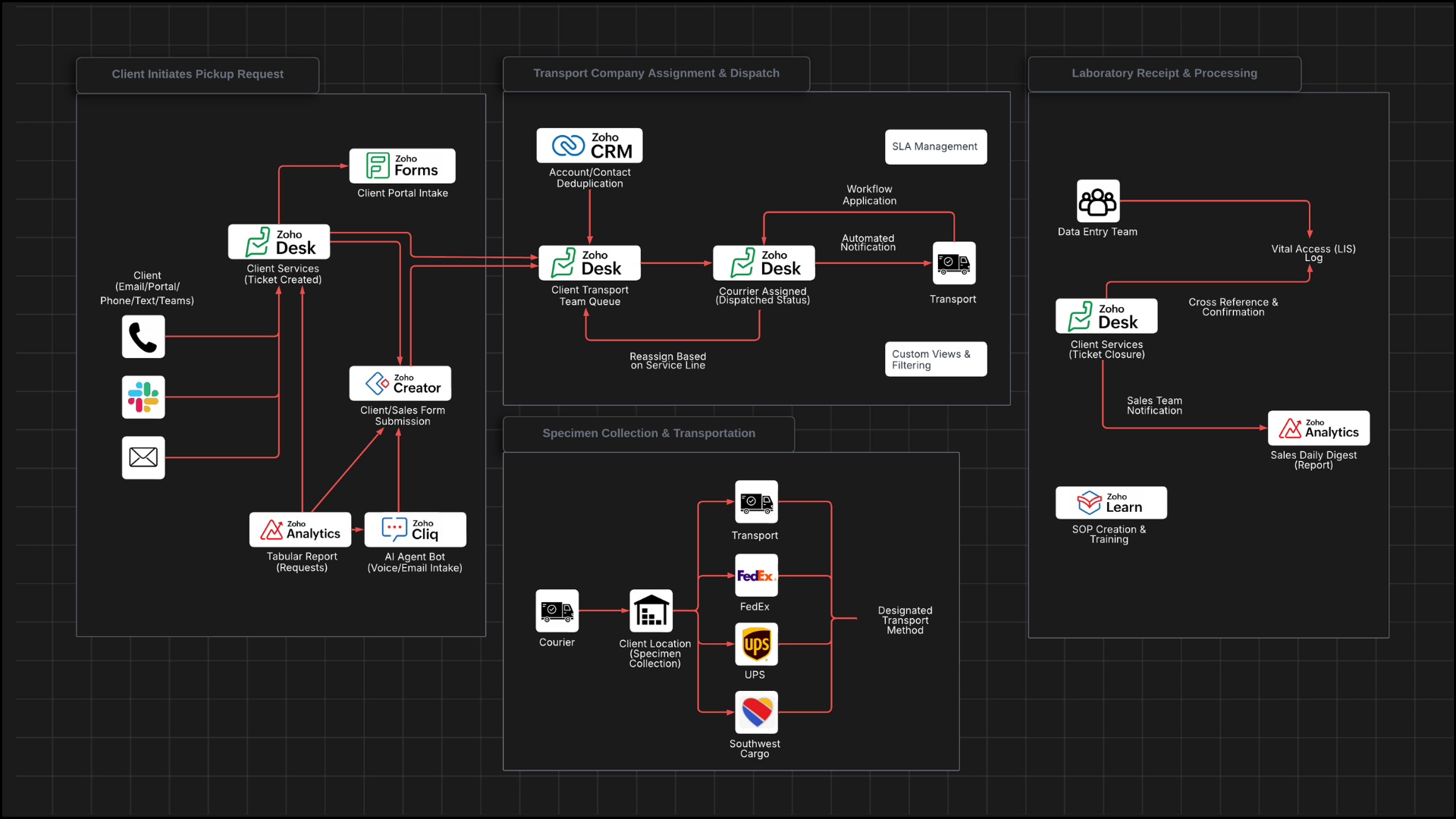
This action plan outlines the customer journey for specimen pickup requests and the internal processes needed to support that journey in Zoho Desk.
Specimen Pickup Request Process
Client Initiates Pickup Request
1) Client services will submit specimen pickup request through multiple channels (phone calls, text messages, email, Teams messages) using Zoho Desk (recommended) or the Zoho Creator form
2) Clients will submit specimen pickup request via Zoho Desk help center
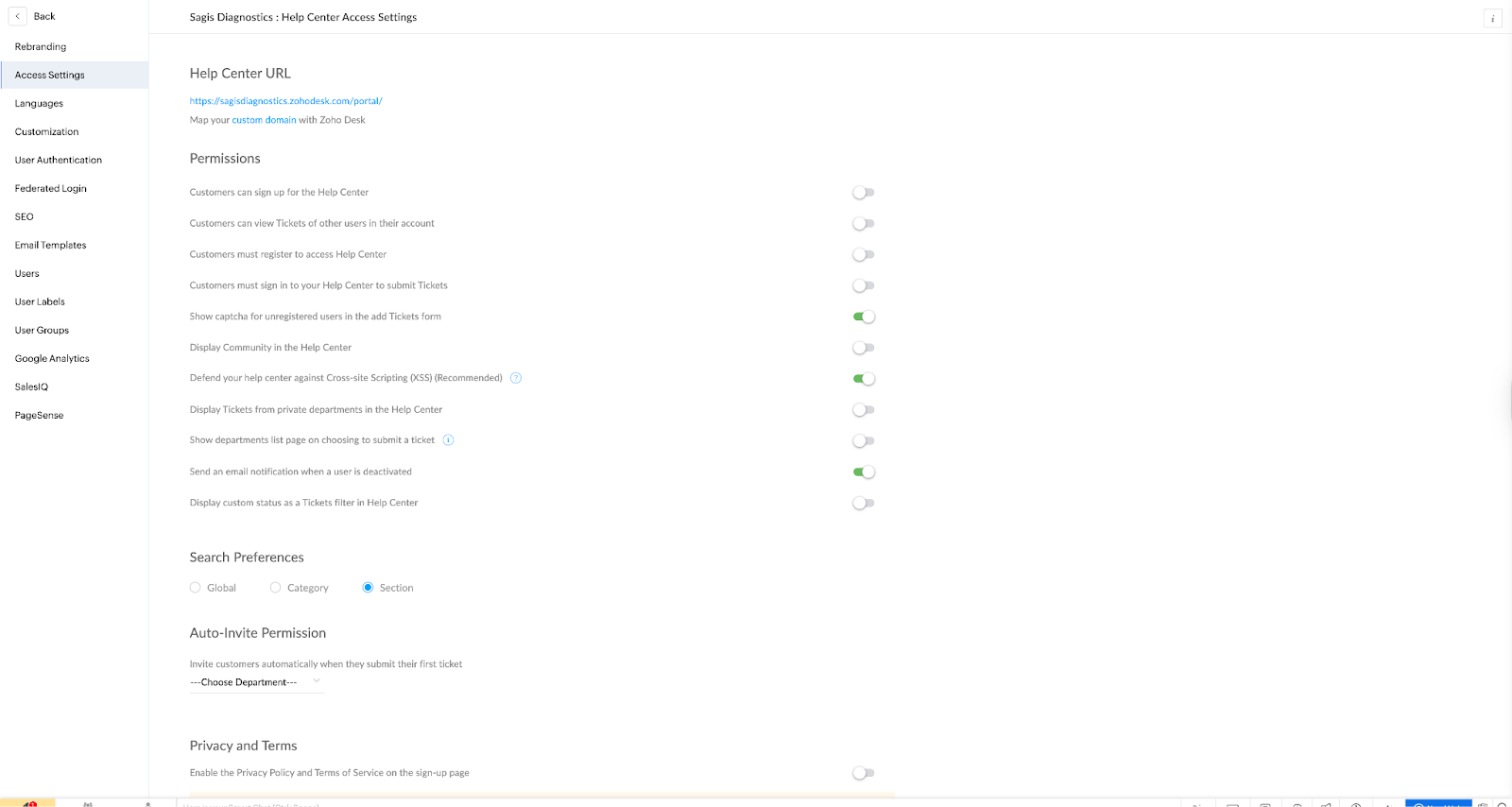
Client can give portal access to clients through help center where they can access all tickets and add additional pickup requests from the portal
NOTE: they can add themselves to the help center (you can add help articles on how they can add themselves and create pickup requests) or you can send them invites (screenshots for each options below)
Alternatively, Brockbank Consulting will configure Zoho Forms for clients to add their own specimen pickup request intakes
3) Sales person will submit specimen pickup request via the Zoho Creator form
The idea is also to allow our salespeople at some point… to be able to schedule pickups while they’re in the field… We would just embed the form that we create into our Zoho app that we created in Creator. So it would be the form.
Brockbank Consulting will integrate the Zoho Creator form with Zoho Desk client service >> specimen pickup request tickets
Brockbank Consulting can configure Zoho Creator form for standardized specimen pickup request submission (internal and external access)
NOTE: Zoho Creator should be used as you can use it as an external form (just using a link) and it can integrate with the Zoho Desks accounts/contacts list via lookup fields
Brockbank Consulting will create a tabular report of specimen pickup requests in Zoho Analytics which links Zoho Desk tickets to Zoho Creator accounts/owners
Brockbank Consulting will configure the Zoho Analytics dashboard with a multi-select sales person filter which can be accessed by each salesperson whenever they’d like
Brockbank Consulting will add all the details of the specimen pickup form to the tabular report
NOTE: Add this to report to Zoho Creator
Brockbank Consulting will add this standardized form into client's Zoho Creator app for sales team use
Account Name (auto-populate address from account
NOTE: syncs every hour
NOTE: there will be a link generated on each account which will add a unique ID to a hidden field within
Department (“Client Services” should be auto-filled)
Layout (“Specimen Pickup” should be auto-filled)
Contact Name and Phone/Email
Channel (Phone, Text, Email, Teams, Form)
Subject and Description/Notes
CS Request Type = On-Demand Specimen Pickup
Priority (e.g., STAT, Standard) with SLA logic
Transport Company (client Transport, FedEx, UPS, Southwest Cargo)
Service Line (Surgical, Dermatology, Podiatry, Toxicology)
Requested Pickup Date/Time
Address (auto from account; editable if needed)
Pickup Location details (e.g., front desk, lockbox)
Courier Assigned (populated by transport team when dispatched)
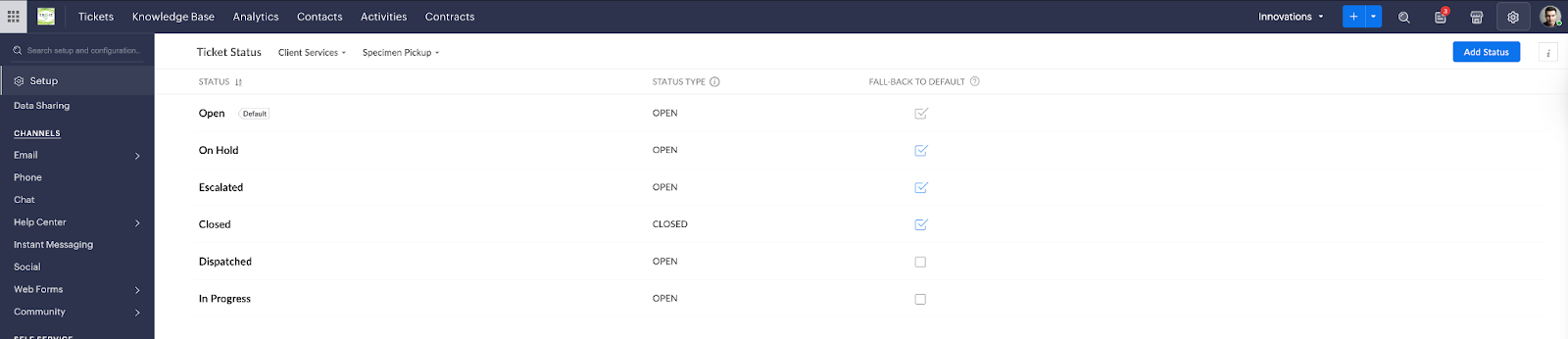
Status (Open → Dispatched → Closed)
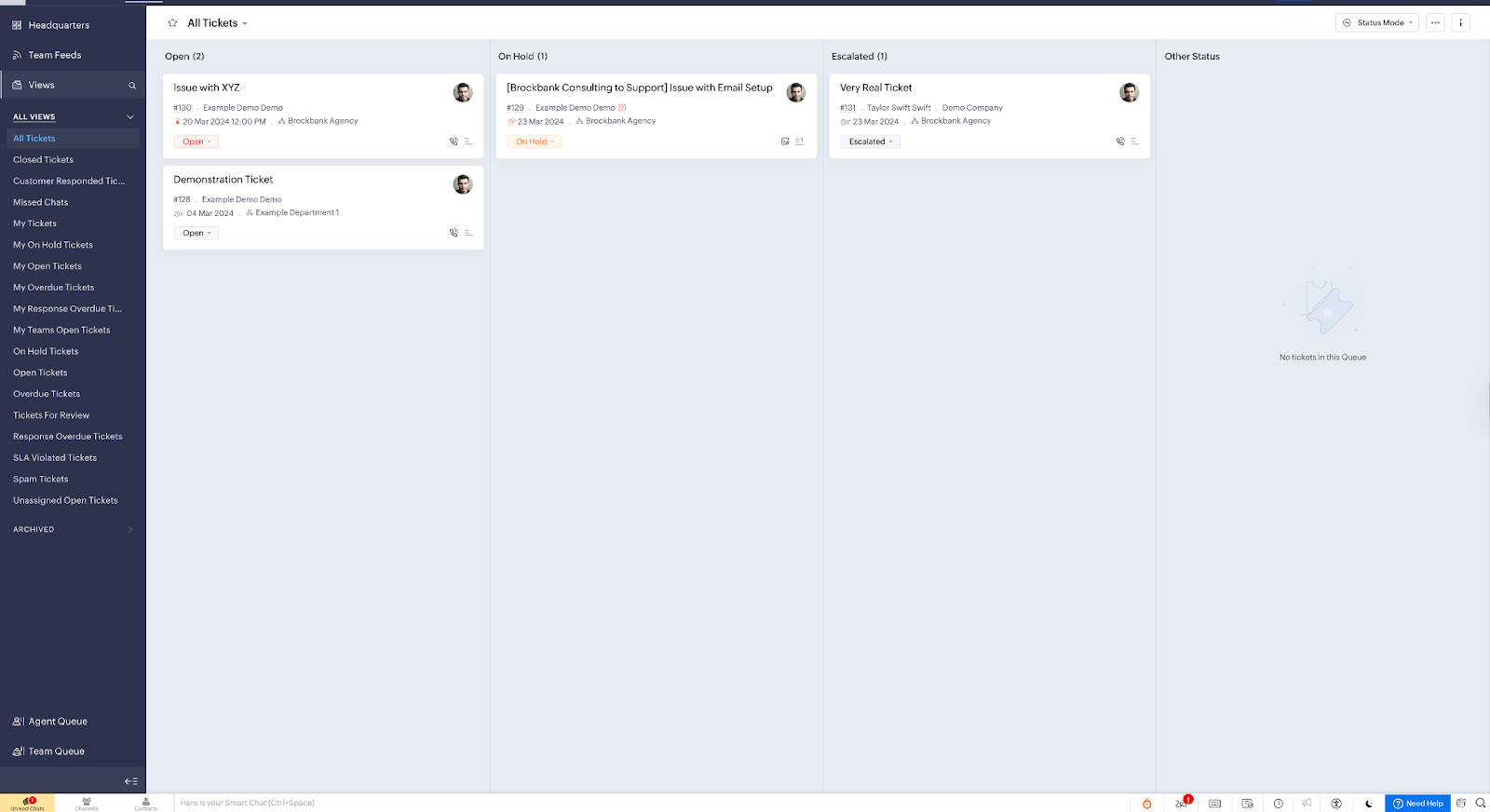
Brockbank Consulting will configure the following stages to the Zoho Desk ticket statuses and send a video to the team on how to use the Zoho Desk statuses kanban view
Brockbank Consulting can configure notifications to update the client at each stage of this process so that the client is updated automatically on their pickup request
Intake — Request captured from phone/text/email/Teams/form; ticket created with required fields
Brockbank Consulting will add an automation to notify client Transport when a ticket is assigned to them
Verify – Details are verified before dispatch
Dispatched — Courier selected and scheduled; “Courier Assigned” set; status updated
Brockbank Consulting will automate the ticket status “Dispatched”
NOTE: When courier is assigned, this stage is automatically updated
NOTE: When “Pickup Confirmation” is filled out, this stage should be automatically updated
Received — Specimens confirmed in Vital Access for the account/date
Lost – Not received
NOTES: Currently 40% of requests use client Transport (Texas), 60% use FedEx/UPS/Southwest Cargo (outside Texas). Time constraints have prevented form creation previously.
Brockbank Consulting can create AI agent capabilities to allow copy/paste of emails or voice notes to auto-generate ticket drafts (this can be part of the Zoho Creator flow/through a Zoho Cliq bot which can guide the collection of all required information)
Brockbank Consulting can create a proof of concept using an N8N Zoho AI Agent form which will analyze request and create a ticket
https://youtu.be/PGcAQ1nrK-I?si=6UJGrZGA7Uc6YsRj
Client services team will complete required fields if not done already: account selection, contact information, priority, transport company, service line, pickup date/time, address, pickup location details
Zoho can auto-populate address information on the ticket when account is selected
Brockbank Consulting will configure the account information to populate the ticket information
NOTE: is the pickup request always the accounts address? If not, the address information should be accessible on the ticket so it can change per pickup request (95% of the time pickup request is account address)
NOTES: Duplicate accounts currently exist due to inadequate training. Account information stored in Zoho Creator but not integrated with the CRM system.
Brockbank Consulting can integrate Zoho CRM with Zoho Desk so team can use the deduplication feature in Zoho CRM to clean accounts/contacts within Zoho Desk (totally optional, just something to think about)
Transport Company Assignment and Dispatch
Zoho will automatically assign tickets to “client Transport team” (the ticket owner field) when transport company is “client Transport”
Client Transport team will monitor their team queue within Zoho Desk for new assignments
Client Transport team will dispatch courier and update “Courier Assigned” field with specific person’s name/initials
Zoho will trigger workflow rules to change status to “Dispatched” and reassign ticket back to appropriate client services team based on service line (surgical, dermatology, podiatry, toxicology)
Brockbank Consulting will configure this
NOTES: Client Transport is a separate company with limited process control. They currently use initials instead of full names for courier assignment.
Specimen Collection and Transportation
Courier will collect specimens from client location
Multiple specimens may be packaged together, especially for client Transport consolidation at courier facilities
Courier will ship specimens via designated transport method (client Transport, FedEx, UPS, Southwest Cargo)
NOTES: Southwest Cargo shipments lack manifest details, causing specimen tracking issues. No current scanning occurs at pickup.
Laboratory Receipt and Processing
Data entry team will receive specimens and log them into Vital Access (LIS system)
Client services team member will cross-reference Vital Access daily to verify specimen receipt
Team member will search Vital Access by account name and receive date to confirm specimens match ticket requests
Team member will close tickets in Zoho Desk once specimens are confirmed received (We would recommend changing “Closed” to “Received” but this is a small suggestion not a must-have)
NOTES: Two different teams handle ticket creation vs. specimen receipt. Individual specimen tracking not possible at this time as clients often don’t know which specimens are in a specific specimen pickup request
Sales Team Notification
Zoho will send automated notifications to sales representatives a daily digest of clients’ specimen pickup requests are completed (this will send daily the report that joins Zoho Creator/Zoho Desk pickup information)
NOTE: The report should be pre-filtered date field (via the link in the email to the last day of pickup requests)
Brockbank Consulting will configure this
Sales representatives will access real-time reports filtered by their accounts to view pickup request status
NOTE: as mentioned above
NOTES: Sales team currently lacks visibility into client pickup requests and seeks notifications similar to previous email CC system.
Additional Process Improvements
Training and Documentation
Brockbank Consulting will provide SOP creation training using Zoho Learn
Client services team will create video-based SOPs for new system processes
Brockbank Consulting will establish sustainable training workflow for ongoing system modifications
SLA Management
Brockbank Consulting can configure Zoho with a 4-hour SLA for STAT priority requests along with other SLAs
Brockbank Consulting can configure priority-based workflow rules and reminders
Custom Views and Filtering
Brockbank Consulting can create filtered views in Zoho Desk for new proposed statuses
Client services team will use custom views to see only specimen pickup requests (not all ticket types)
Individual team members will create personal views for tickets they created or are assigned to
Future Integration Opportunities
Vital Access API Integration
Brockbank Consulting will explore API capabilities for automatic ticket closure when specimens are scanned
NOTES: Vital Access has limited API functionality. Integration timeline estimated 6+ months minimum.
Specimen-Level Tracking
Future barcode system implementation will enable individual specimen tracking within pickup requests
Current process tracks at request level only due to client uncertainty about specimen quantities
Optional specimen detail fields recommended for gradual adoption over 5-10 year timeline
Transport Company Logic
Automated assignment based on geographic location (Texas = client, Outside Texas = FedEx/UPS)
Support for Southwest Cargo air bill tracking without detailed manifests
Service Line Routing
Workflow rules to route completed requests to appropriate internal teams (surgical, dermatology, podiatry, toxicology)
Get the latest insights and updates delivered to your inbox weekly.
Thank you! Your submission has been received!
Oops! Something went wrong while submitting the form.
Trusted by Leading Brands
"They have a gift for clearly explaining how Zoho should work. If you’re serious about getting the most out of Zoho, partnering with Brockbank Consulting is a no-brainer."
Book your free consultation to learn how Zoho should work for your business. We will show you the best practice ways to set it up and use it for your industry so you get the most out of Zoho.