Get the latest insights and updates delivered to your inbox weekly.
Thank you! Your submission has been received!
Oops! Something went wrong while submitting the form.
Trusted by Leading Brands
‘‘Brockbank Consulting transformed our operations and boosted our efficiency.’’
--Emily Johnson, CEO at Tech Innovations
Zoho Action Plan
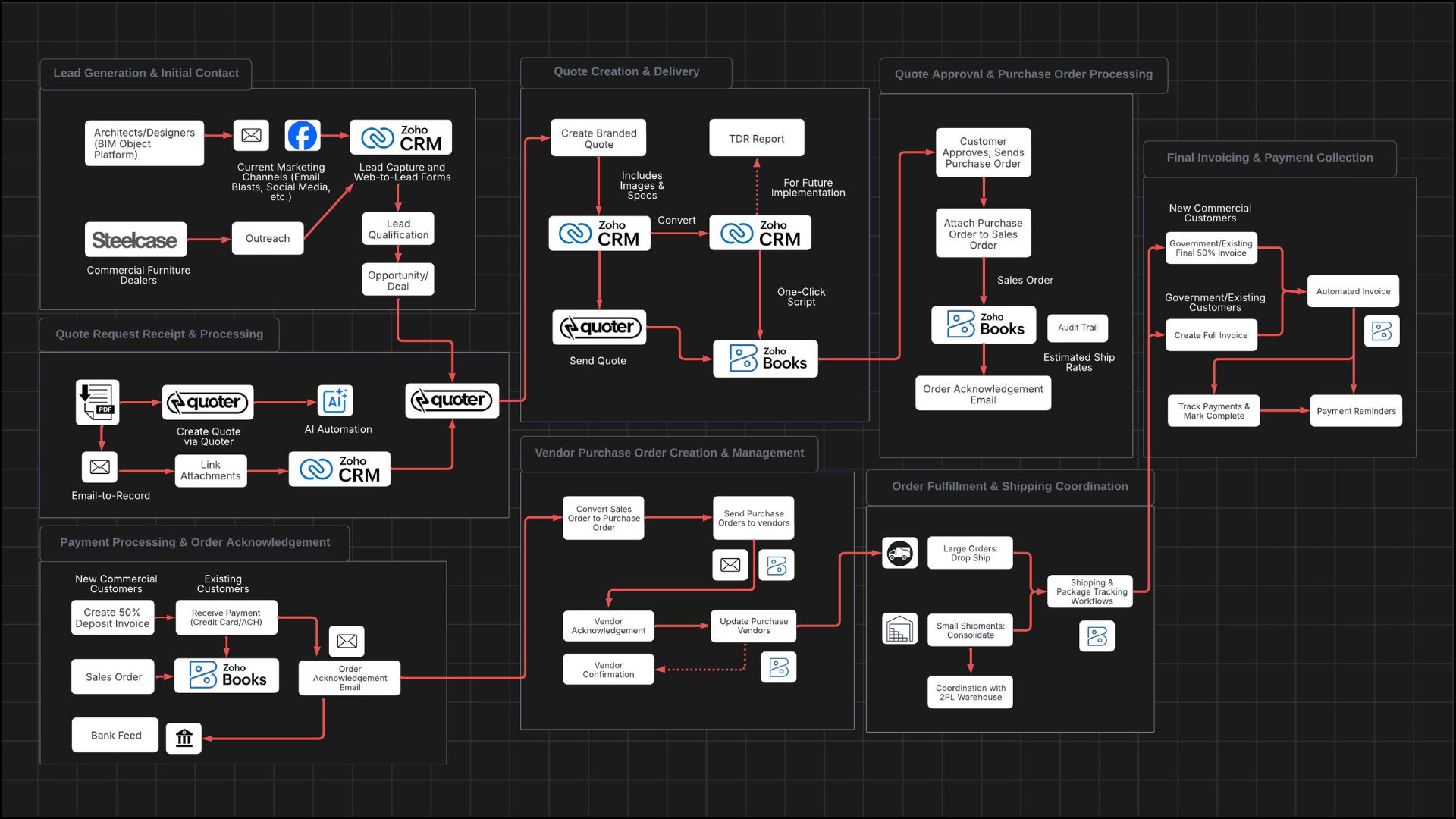
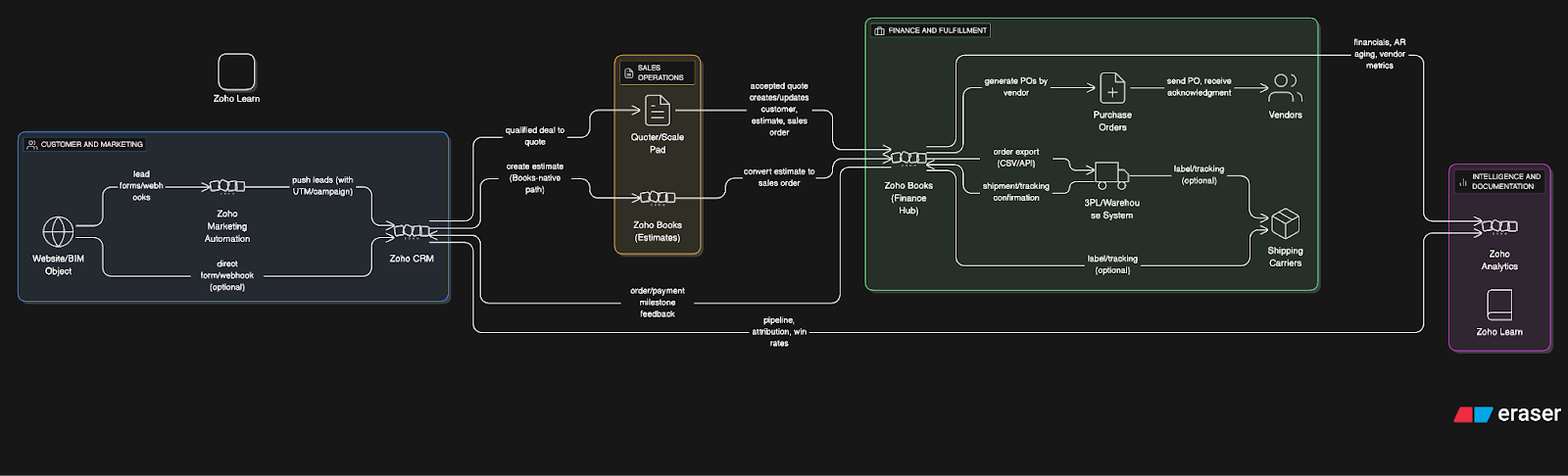
This comprehensive action plan details the strategic implementation of Zoho One to enhance the operations of a dual-channel design firm catering to both government and commercial clients. It meticulously outlines the customer journey, from lead generation through Revit files and marketing channels to quote processing and order fulfillment. The plan emphasizes the integration of Zoho Books for efficient quote creation, delivery, and conversion to sales orders, along with streamlined payment processing and vendor management. Additionally, it covers data migration, integration with existing systems, and the setup of marketing automation to improve lead follow-through. The primary objective is to complete the Zoho Books setup by the start of the fiscal year, ensuring a scalable system to support the firm’s growth ambitions.
Lead Generation and Initial Contact
Architects/designers discover the client through Revit files on BIM Object platform
NOTES: Revit files are CAD software files that architects use to place products in building drawings/specifications
Architects/designers find the client through current marketing channels (email blasts, social media, paper catalogs)
NOTES: Current email list contains approximately 5,000 contacts built over years from project inquiries
Commercial furniture dealers (Steel Case, etc.) reach out to the client to team up on GSA projects for ancillary products
Brockbank Consulting will set up lead capture forms and web-to-lead functionality in Zoho CRM
Quote Request Receipt and Processing
Customer sends quote request via email with PDF attachments containing specifications
NOTES: Quote requests typically contain 1-15 line items, usually no more than 10 items per quote
The client will receive quote requests and create quotes in Quoter
Brockbank Consulting will explore AI automation for Phase 2 to extract product information from PDF specifications
Brockbank Consulting can set up email-to-record functionality to automatically create quote requests from emails
Zoho CRM will store quote attachments (specification sheets, drawings) linked to each quote record
Brockbank Consulting will train the client on how to do this via a loom video
Quote Creation and Delivery
The client will create quotes in Quoter including product images and specification sheets
NOTES: Quotes can range from small orders to $300,000+ for government projects. Also the client will be adding products as they go.
Brockbank Consulting will go into the client's Quoter account and will set up the out of box integration between Quoter and Zoho CRM (Quoter home page >> Settings >> Integrations >> Zoho >> Set up)
Brockbank Consulting will integrate Zoho CRM quotes with Zoho Books sales orders
NOTE: use the Zoho CRM quote button script to convert to sales order
Brockbank Consulting will integrate Zoho CRM with Zoho Books using out of box integration
The client will send professionally branded quotes to customers via quoter
TDR Report
Brockbank Consulting will assist the client in creating TDR Report in Zoho
NOTE: we will need to do a small discovery meeting to further detail out the work for this report
Quote Approval and Purchase Order Processing
Customer approves quote and sends purchase order to the client
The client will convert approved quotes in Zoho CRM to sales orders in Zoho Books with one-click conversion (this will be a button on the Zoho CRM quote)
The client will attach customer purchase orders to Zoho Books sales order records for tracking
Brockbank Consulting will configure sales order templates and numbering sequences
Zoho will maintain audit trail of all changes made to orders including change log with user attribution
Brockbank Consulting will show the client how to use the log via loom video, Zoho CRM deal timeline (show’s interactions)
Payment Processing and Order Acknowledgment
For New Commercial Customers: The client will create 50% deposit invoice before processing
For Government/Existing Customers: No deposit required, proceed directly to order acknowledgment
The client will send order acknowledgment emails with estimated ship dates (custom orders only)
NOTES: For existing customers and standard orders, order acknowledgment sent immediately upon order entry
Brockbank Consulting will show the client how to send out the order acknowledgement email through Zoho Books sales order either via email with a PDF template (sent currently through account edge where it’s currently labeled invoice which is an annoying misnomer)
NOTE: let’s label it “Order Acknowledgement”
Brockbank Consulting will set up ACH and credit card payment integration with invoices
Zoho will automatically generate modern, professionally branded invoices with online payment options
Brockbank Consulting can assist the client with integrating their bank with Zoho Books to see transaction data and more
NOTE: send the client section of Zoho Books masterclass going over bank connection
Vendor Purchase Order Creation and Management
The client will convert sales orders to multiple purchase orders based on vendor requirements
NOTES: Single sales order may require multiple POs as products come from different vendors (fiberglass factory, metal suppliers, warehouse inventory)
The client will send purchase orders to appropriate vendors via email through Zoho Books purchase orders module
Vendors will respond with sales order acknowledgment numbers
The client will update purchase orders in Zoho with vendor acknowledgment numbers for tracking
Brockbank Consulting will configure PO templates and vendor-specific workflows
Brockbank Consulting will set up automated PO generation with line item selection capabilities
Phase 2 Enhancement: Brockbank Consulting will create automated vendor confirmation system
NOTE: Zoho will send automated reminders to the vendors (every other day) and will update the purchase order to “Processing” if they respond to the reminder with the word “Processing” (or something like this). If this isn’t feasible, then I suggest a form where the can click into, (prefill a hidden form with ID, then they can update the status of the purchase order).
Order Fulfillment and Shipping Coordination
Large Orders: Vendors will drop ship directly to customers
Multiple Small Shipments: Products will ship to warehouse for consolidation before customer delivery
NOTES: Consolidation used to avoid spamming customers with multiple deliveries, especially for overseas or difficult military base deliveries
The client will coordinate with vendors on shipping timelines through phone calls, emails, and meetings
The client will work with new 3PL warehouse system using Excel spreadsheets for communication
NOTES: New warehouse uses 3PL system (name unknown, starts with “E”) - integration to be explored in Phase 2
Brockbank Consulting will configure shipping and package tracking workflows
Phase 2 Enhancement: Brockbank Consulting will explore integration with 3PL warehouse system
Final Invoicing and Payment Collection
New Commercial Customers: The client will create final 50% invoice before shipment
Government/Existing Customers: The client will create full invoice after shipment (Net 30 terms)
The client will track payments and mark orders complete in Zoho Books
Brockbank Consulting will set up automated invoice generation based on shipping confirmations
Zoho will send payment reminders and track aging reports
Brockbank Consulting will set up Zoho Learn autopilot training system
Brockbank Consulting will create SOPs for major configurations/setup and add them to Zoho Learn for internal training
Additional Requirements
Data Migration and Setup
The client will manually add approximately 130 main products to Zoho Books (500 total with variations/finishes)
NOTES: Existing AccountEdge data is 25+ years old and contains poor quality data, manual entry preferred for data cleansing
Brockbank Consulting can take all AccountEdge data and migrate it to Zoho Analytics for the client (they will need to do full backup from AccountEdge)
Brockbank Consulting will set up product catalog with images, specifications, and pricing
The client will continue adding items as new purchase orders come in during transition
Marketing and CRM Setup
Brockbank Consulting will configure Zoho Marketing Automation (preferred over Zoho Campaigns)
NOTES: Marketing Automation provides landing pages, web forms, and better CRM integration than Campaigns
Brockbank Consulting will migrate existing Constant Contact email list (5,000 contacts) to Zoho Marketing Automation
Brockbank Consulting will set up automated follow-up sequences for leads generated from BIM Object/Revit file downloads
Phase 2: Brockbank Consulting will create executive dashboard showing customer journey flow and financial metrics
Timeline and Priorities
Phase 1 Goal: Complete Zoho Books setup by July 1st (fiscal year start) - considered success milestone
Primary Focus: Finance/accounting system replacement (AccountEdge to Zoho Books)
Secondary Focus: Basic CRM setup for lead follow-through improvement
NOTES: The client acknowledged they are “horrible with follow-through” on potential customers, especially commercial hospitality prospects
Get the latest insights and updates delivered to your inbox weekly.
Thank you! Your submission has been received!
Oops! Something went wrong while submitting the form.
Trusted by Leading Brands
"They have a gift for clearly explaining how Zoho should work. If you’re serious about getting the most out of Zoho, partnering with Brockbank Consulting is a no-brainer."
Book your free consultation to learn how Zoho should work for your business. We will show you the best practice ways to set it up and use it for your industry so you get the most out of Zoho.